Free Fire Advance Server – Download OB51 APK For Android
If you’ve ever wondered how some players and streamers get early access to Free Fire updates, they’re testing everything ahead of time on the Free Fire Advance Server. It’s not just a preview version; this is where Garena rolls out new features, characters, weapons, and events before they hit the main game.
I still remember the first time I got into the Advance Server—it felt like I had unlocked a hidden world. It was so fun enjoying new features.
And guess what? You can get in too.
| Game | Garena Free Fire / Free Fire MAX |
| Downloads | 1B+ (Based on Google Play Store) |
| Ratings | 4.4+ (Based on 18.8M+ reviews) |
| Size (Approx. APK) | ~95 MB–101 MB (varies by device) |
| Current Live Patch | OB51 (Released Oct 29, 2025) |
| Live Patch Features | Includes new character Nero, “Flame Arena” mode, and weapon adjustments. |
| Latest Version | ~v1.118.1 |
| Device | Android |
| License | Free-to-play |
| Latest News (Nov 17) | OB52 update announced and releasing soon. |
| Upcoming Features | The OB52 update will feature a Jujutsu Kaisen collaboration. |
| Community Activity | Daily redeem code events are active throughout November. |
What Is Free Fire Advance Server?
The Free Fire Advance Server is Garena’s official testing platform. It’s where they release upcoming features to a select group of players before making them public. This is where new characters, weapon balances, map designs, and even system updates get tested. Think of it as a laboratory where you can actually help developers tweak the game.
Approximately 10,000 to 15,000 players are selected for this test. Players get to experience cutting-edge content before anyone else and even earn rewards for finding bugs. Meanwhile, Garena gets valuable feedback from real players in real-world conditions on their actual devices.
During the OB48 testing phase alone, players submitted around 100,000 bug reports. These weren’t complaints—they were crucial data that helped developers fine-tune the game before official release.
During the OB51 cycle, top testers even walked away with up to 3,000 diamonds just for contributing bug reports and feedback. That’s real money value for helping improve the game you love playing.
How Does Free Fire Advance Server Actually Work?
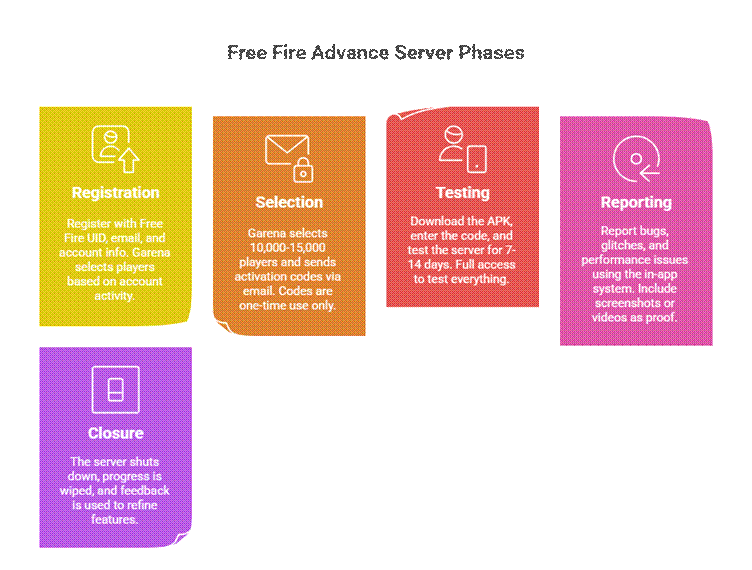
The process is straightforward, but it involves specific phases that you need to understand.
- The Registration Phase
- The Selection and Code Distribution
- The Testing Phase
- The Reporting Phase and Closure
Who Can Actually Access the Advance Server?
Here’s where it gets selective. Not everyone can join, and Garena has strict eligibility criteria.
The Basic Requirements
- You must be 18 or older
- Your Free Fire account must be linked to Facebook or Google
- Your account should be at least 9 months old
- Your gameplay must be clean (no bans or suspicious activity)
Garena wants experienced, active players, not new or inactive accounts.
Regional Restrictions
The Advance Server isn’t available in every country. If Free Fire itself is restricted in your region, the Advance Server probably won’t work there either.
Step-by-Step Registration and Access Process
Let’s walk through exactly how to register and gain access, as this is where most players tend to get confused.
Step 1: Visit the Official Website
Go directly to the official Garena Free Fire Advance Server website. Don’t use any third-party sites for initial registration—only use Garena’s official platform.
Step 2: Choose Your Login Method
You’ll see two login options: Facebook or Google. Pick whichever account is linked to your main Free Fire ID. This is crucial because the activation code you receive will be tied to this exact account. If you log in with an account that is not linked to your Free Fire ID, you’ll encounter login errors later.
Step 3: Fill Out the Registration Form
After logging in, you’ll see your Free Fire name in the top right corner, confirming the correct account is selected. Now you’ll see the registration form. Fill in every field accurately:
- Your Free Fire UID (you can find this by opening Free Fire and going to your profile)
- A valid, active email address
- Any other information they request
Double-check everything before submitting. Typos or incorrect information can disqualify you.
Step 4: Submit and Wait
After clicking “Submit,” you’ll receive a confirmation message. But here’s what people don’t realize—getting this confirmation doesn’t mean you’re selected. It simply means that your registration has been received. The actual selection happens during Garena’s review process, which can take a few days.
Step 5: Check Your Email
If you’re selected, you’ll receive an email from Garena with:
- Your activation code
- A download link for the APK file
- Instructions on how to proceed
This email is your golden ticket. Save it somewhere safe because you’ll need the activation code multiple times during the process.
Downloading and Installing the Advance Server APK
Once you’ve received your activation code, follow these steps to get the game running.
Once you get your activation code, follow these steps to install the app on your Android device.
Before You Download
Make sure your device meets these minimum system requirements:
- Android version 5.0 or above
- 1GB of free storage (2GB recommended)
- Good internet connection
- “Install from Unknown Sources” enabled in settings
To enable unknown sources:
Settings → Security → Unknown Sources → Enable
Download and Install
- Click the download link from your email or the official site
- Wait for the APK to download (file is usually 600–900 MB)
- Open your File Manager
- Find the APK file (in Downloads)
- Tap to install
- Wait for it to finish
- Tap “Open”
If the install fails, clear some space or re-download the file.
Using Your Activation Code Correctly
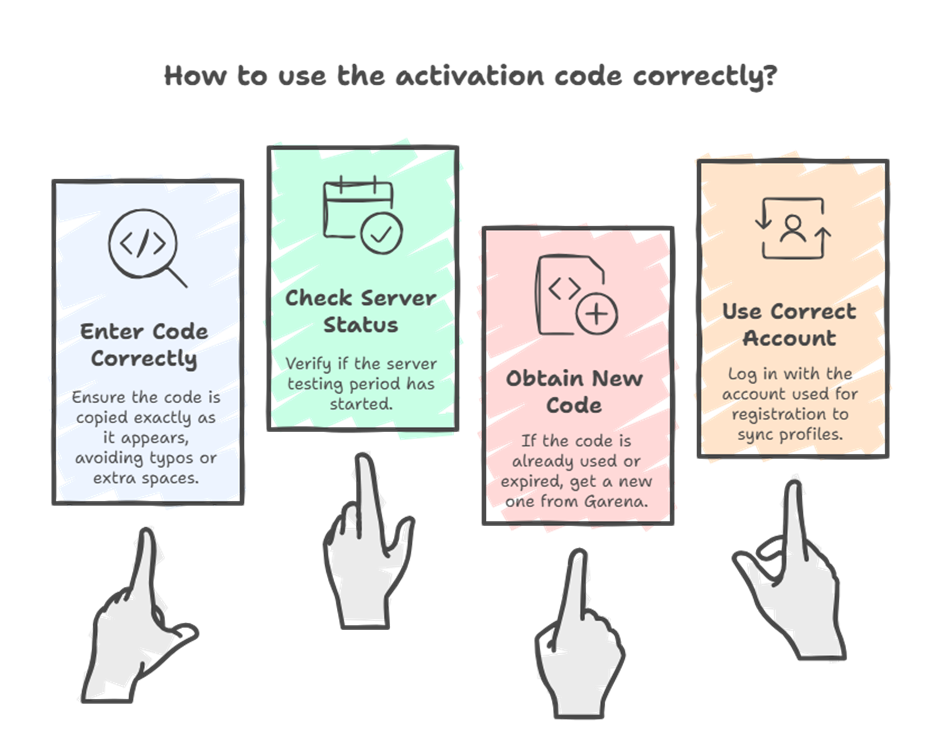
This is where people mess up. The activation code is specific and sensitive.
What You Need to Know About Codes
When you open the Advance Server app for the first time, you’ll see a box asking for your activation code. Copy the code directly from your email (don’t type it by hand).
Click “Confirm” and proceed to log in with the same Facebook or Google account you used earlier.
If Your Code Doesn’t Work
Here are the common issues:
- You’re trying to log in before the testing window opens
- The code was already used (by someone else)
- You entered the code incorrectly
- The code expired
Don’t stress out. Recheck everything and ensure the testing phase is live.
After Entering Your Code
Once your code is accepted, you’ll be prompted to log in with your Facebook or Google account. Use the exact account you registered with. The system will then sync with your main Free Fire account and load your profile.
How to Earn Free Diamonds and Rewards
This is why many players are excited about the Advance Server. You can legitimately earn rewards.
Bug Reporting Rewards
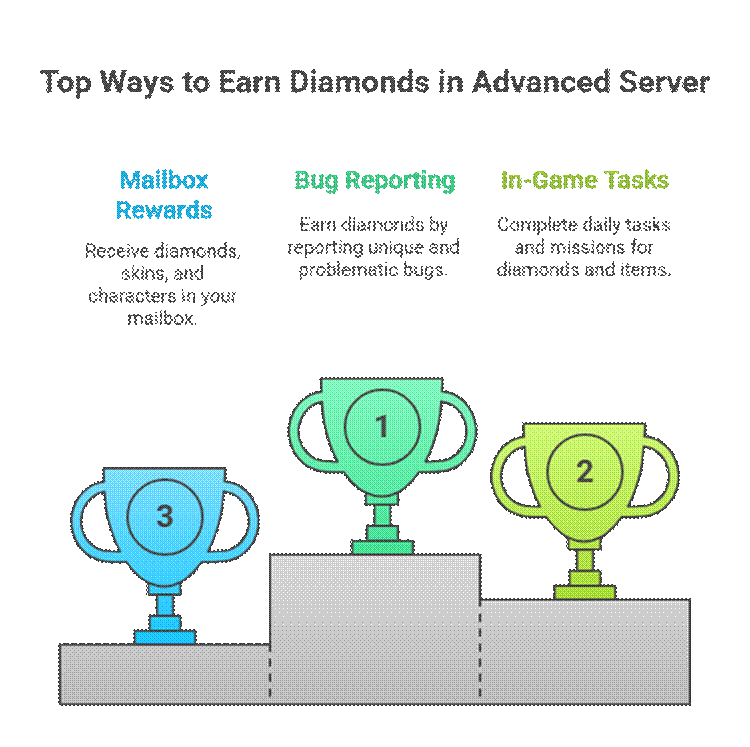
For every valid bug you report, you typically earn 100 diamonds. If you’re one of the top contributors, you can earn 1,000 to 3,000 diamonds throughout the testing period. These aren’t just digital nothing—they’re real currency that transfers to your main account.
Finding Quality Bugs
Not all bugs count. Garena wants bugs that are actually problematic. Common ones include:
- Damage not registering correctly in certain situations
- Characters getting stuck in the map geometry
- Weapons not functioning as intended
- UI elements not responding to taps
- Connection or lag issues
When you find a bug, document it properly:
- Take a video showing exactly what happens
- Note the specific steps to reproduce the bug
- Include details about your device and Android version
- Submit through the in-game feedback form
Timing Matters
Here’s something crucial that experienced testers know: the first person to report a unique bug gets the reward. If someone else has already reported it, your report will be marked as a duplicate, and you won’t earn diamonds. Some competitive testers literally race to report bugs they find, so the faster you are, the better your reward rate.
Completing In-Game Tasks
Beyond bug reporting, the Advance Server usually includes daily tasks, login bonuses, and mission rewards. These are standard activities—play matches, reach certain levels, complete specific objectives—and they reward diamonds or other items. These stack up quickly if you’re active throughout the testing period.
Mailbox Rewards
Throughout the testing period, you’ll receive rewards directly to your in-game mailbox. These could be diamonds, skins, characters, or other items. They’re automatically transferred to your main Free Fire account once the testing period ends and Garena validates everything.
Important: How Rewards Are Credited
All diamonds and rewards you earn on the Advance Server don’t appear in the test server itself. Instead, they’re credited directly to your main Free Fire account a few days after the testing period concludes. This is after Garena reviews your reports to ensure they’re legitimate and that you have not submitted duplicates or false information.
Common Problems and How to Fix Them
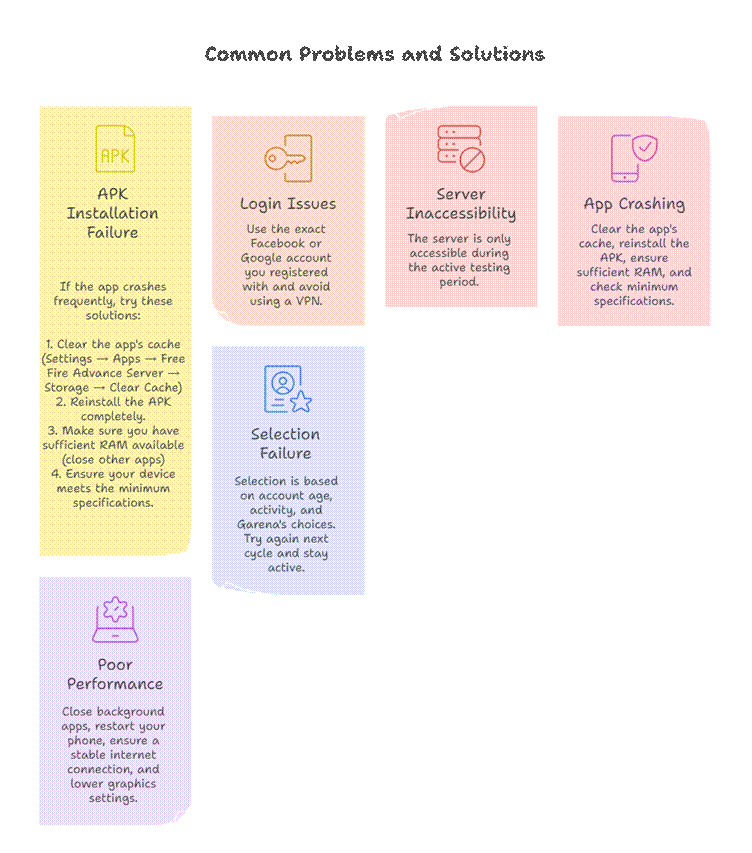
If something goes wrong, here’s how to troubleshoot.
- The APK Won’t Install
- Login Fails After Installation
- The Server Won’t Open or Shows Blank Screens
- App Keeps Crashing
- Poor Performance or Lag
- Can’t Get Selected?
Free Fire Advance Server vs. The Official Game
Understanding the differences is important for knowing what to expect.
| Access | Invite-only via activation code | Open to everyone globally |
| Content | Unreleased features, experimental | Finalized and fully launched content |
| Updates | Previews of upcoming OB updates | Official OB patches and seasonal content |
| Progress | Temporary test accounts, data wiped at the end | Permanent accounts tied to your ID |
| Stability | Buggy and under development | Optimized and polished |
| Rewards | Bug reports and testing activities | Seasonal events and battle pass rewards |
| Gameplay | Unstable with performance issues | Stable with minimal bugs |
| Duration | 7–14 days per cycle | Always online |
| Rankings | No ranked progression | Full ranked system |
The Advance Server is rough. You’ll encounter bugs, crashes, and balance issues. That’s the entire point. The official game is what you play when you want a smooth, competitive experience. The Advance Server is where you help shape that future experience.
The Features and Gameplay in OB51
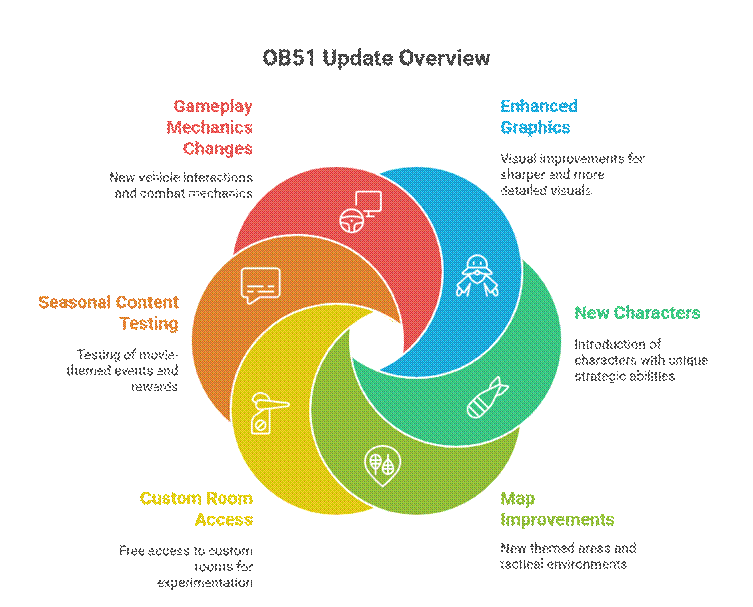
The OB51 update brought specific improvements worth discussing.
Nero – The New Character
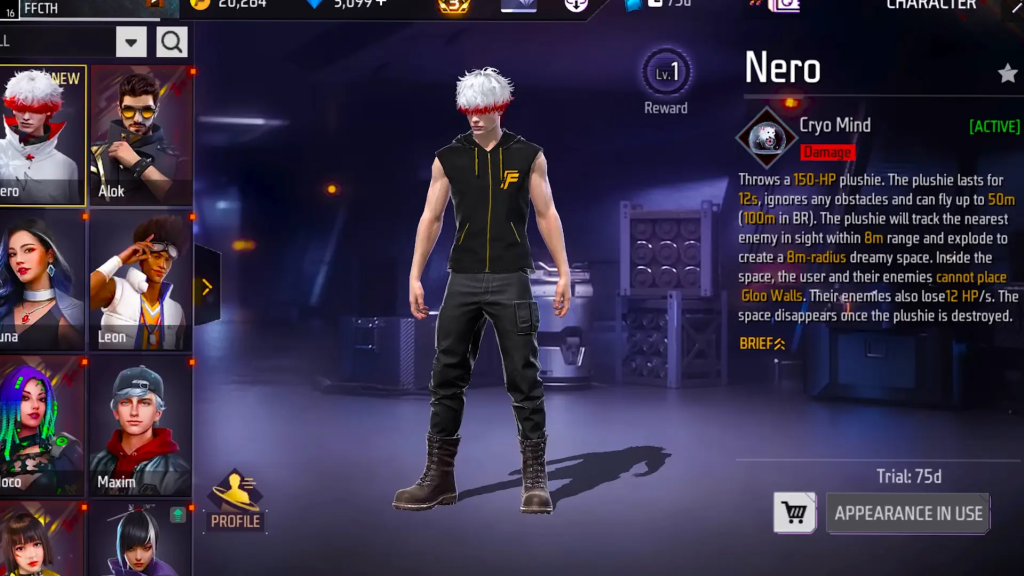
Nero is the headline feature. While Garena hasn’t shared full details yet, early testers believe his ability weakens enemy Gloo Walls. This could completely change close-range fights by giving aggressive players a real counter against defensive walls. If Nero works as expected, rush tactics just became a lot more effective.
Winchester AR – New Assault Rifle

Say hello to the Winchester AR. This isn’t the old lever-action gun—it’s a modern assault rifle that fires two quick shots per trigger pull. Think of it as a mix of the M14 and AC80. It’s accurate, powerful, and deadly from mid to long range. With a scope, it may become your new favourite for both Clash Squad and Battle Royale.
Game-Changing Loadout System
The new loadout system adds a whole layer of strategy before you even start fighting. Here’s what’s included:
- Tactical Market – A portable vending machine you can use mid-match
- Team Booster – Gives temporary buffs to your squad
- Super Leg Pocket – Expands inventory capacity
This lets players gear up smartly instead of relying only on random loot. It’s a big win for strategic survivors.
Winter-Themed Bermuda Map
Bermuda just got a winter makeover. Snow-covered areas, falling flakes, and frosty visuals give the map a fun seasonal twist. Visibility might change slightly due to the fog, but otherwise, it’s mostly a visual refresh. Seasonal events might even follow.
Faster Revivals and Better Team Play
Reviving teammates just got easier. With quicker revival point recharge times, aggressive plays are less risky, and support players are now even more important. Team dynamics feel faster and more intense.
New Cosmetics and Gloo Wall Skins
OB51 also brings fresh skins, bundles, emotes, and upgraded Gloo Wall designs. Some new emotes let you move while performing them. Gloo Wall visuals and durability may also be enhanced.
Performance and UI Tweaks
You’ll notice smoother gameplay, faster load times, and a cleaner interface. This update especially benefits mid-range Android devices and players who’ve struggled with performance and lag.
What Makes the Advance Server Worth Your Time
Some players debate whether testing is worth it, so let’s be honest about this.
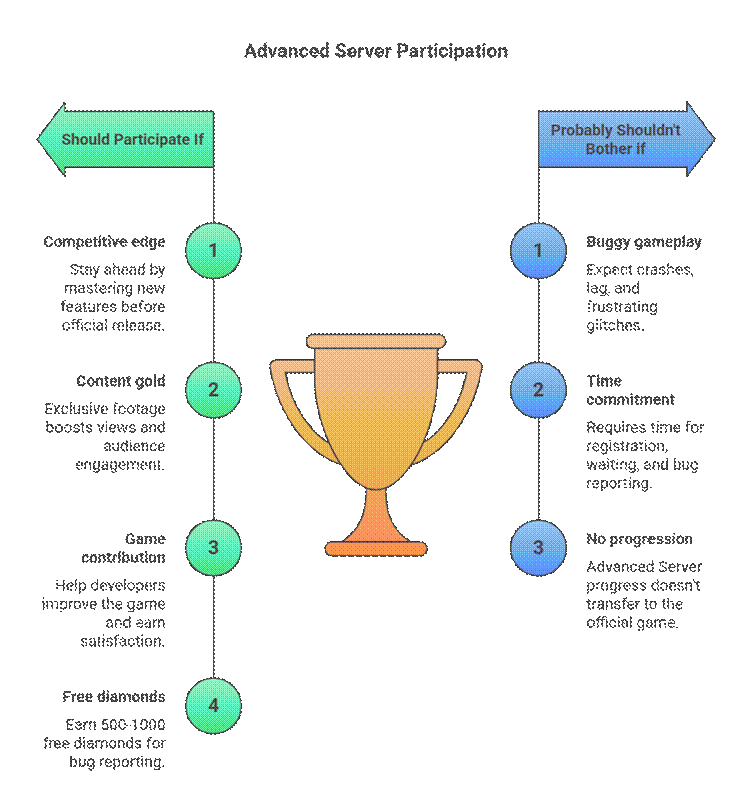
The Timeline and When to Expect the Next Server
Garena typically releases a new Advance Server cycle every 1.5 to 2 months, timed to precede a major OB update.
OB51 Timeline (Example)
- Registration Opens: October 9, 2025
- Activation Codes Released: October 12, 2025 (to selected players)
- Advance Server Launch: October 15, 2025
- Testing Period: 7–14 days active
- Bug Reporting Deadline: October 26, 2025
- Server Closes: October 28, 2025
- Data Wiped and Feedback Reviewed: October 28–November 15, 2025
- Official OB51 Release: Mid-November 2025
How to Know When the Next One Opens
Keep an eye on the official Free Fire social media accounts (Facebook, Instagram, YouTube) and the official website. Garena always announces new Advance Server cycles there. You can also sign up for notifications on the official Advance Server website to get instant alerts when registration opens.
Tips to Actually Get Selected
Your account isn’t automatically selected, so here are realistic strategies that improve your chances.
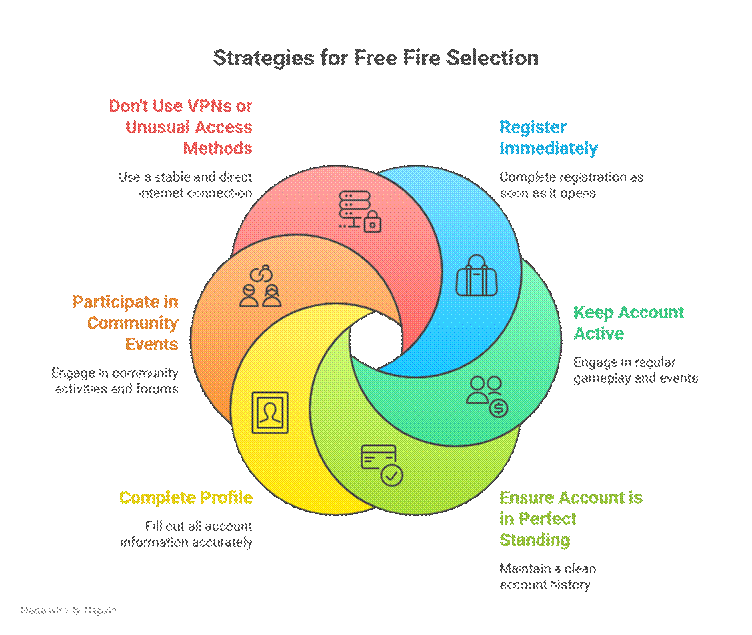
System Requirements You Actually Need
Before downloading, confirm your device meets these specifications:
- Operating System: Android 5.0 or higher (ideally Android 8.0+)
- RAM: 2GB minimum (3GB+ recommended)
- Storage: At least 2GB free space
- Processor: Qualcomm Snapdragon 625 or equivalent or better
- Internet: Stable connection (4G or Wi-Fi recommended)
The good news is these requirements aren’t extreme. Most mid-range Android phones from the past 5 years can handle it. Even budget devices often qualify, though you might experience some lag on lower-end hardware.
Is the Advance Server APK Safe?
People always ask this. Yes, it’s completely safe. The APK comes directly from Garena and is the official version. You’re not downloading from sketchy third-party sites—you’re getting it from Garena’s official channels.
The only risk is downloading from unofficial sources. If you obtain the APK from any source other than the official Garena registration page, it poses a potential security risk. Stick to official sources only.
iOS Players: Can You Participate?
Unfortunately, no. The Advance Server is Android-only. Garena hasn’t developed an iOS version, and Apple’s App Store policies make distributing beta versions complicated for Garena.
If you have an iOS device, you have one option: borrow an Android device to participate. If you’re selected, you can still register and test using someone else’s Android phone. In most cases, your account access isn’t tied to a specific device.
Final Thoughts: Is It Really Worth It?
After all this, is the Free Fire Advance Server worth your time?
If you’re competitive and want to stay ahead, absolutely. The advantage of knowing upcoming changes and practising with new content before others get access is substantial.
If you’re a casual player, it depends on whether you want the experience of being an insider or whether you prefer waiting for the finished product. Both perspectives are valid.
What’s certain is this: the Advance Server gives you a legitimate way to contribute to the game’s development, earn free rewards, and experience content before millions of others. In a game as popular as Free Fire, that’s a meaningful opportunity.