How to Change Region in Free Fire?
Changing the region in Free Fire is one of the most discussed topics, especially for those who want better matchmaking, lower ping, and access to exclusive events. The game is constantly evolving, and Garena has tightened security measures to prevent region manipulation, meaning you need updated, accurate, and safe methods.
In this guide, I’ll show you how to change your region in simple steps.
Understanding Free Fire Regions and How They Work
Free Fire separates players by region to ensure smooth gameplay, stable servers, and localised events. Each region has its own matchmaking pool, in-game events, Elite Pass reward variations, and even special collaborations that may not appear in other countries. Regions also influence:
- Latency and Ping
- Matchmaking Time
- Event Availability
- Rewards and Discounts
- Account Security
Understanding how these regions function will help you know what to expect when you switch to another one.
Why Players Want to Change Region in Free Fire
There are several reasons players attempt to switch regions in Free Fire. Below are the most common motivations:
1. To Play with Friends in Other Regions
You may want to join friends or guilds located on a different server. Switching regions is the only option, as the game doesn’t allow cross-region play.
2. Access to Exclusive Events & Rewards
Some regions get better bundles, cheaper diamonds, earlier updates, or unique collaborations. Players often switch to enjoy these benefits.
3. Reduce Ping & Improve Matchmaking
Changing your region can help reduce your ping if a closer server is available.
4. Competitive Advantage
Some players believe matches in other regions are easier or more challenging, depending on their skill goals.
Important Notice Before You Change Region
Free Fire doesn’t offer an official “Region Switch” feature. Once an account is created in a certain region, it’s permanently locked there. Any change must be done outside normal game settings. This means the process requires workarounds that have both benefits and risks, which we explain in detail below.
How to Change Region in Free Fire Using a VPN (Safe Method)
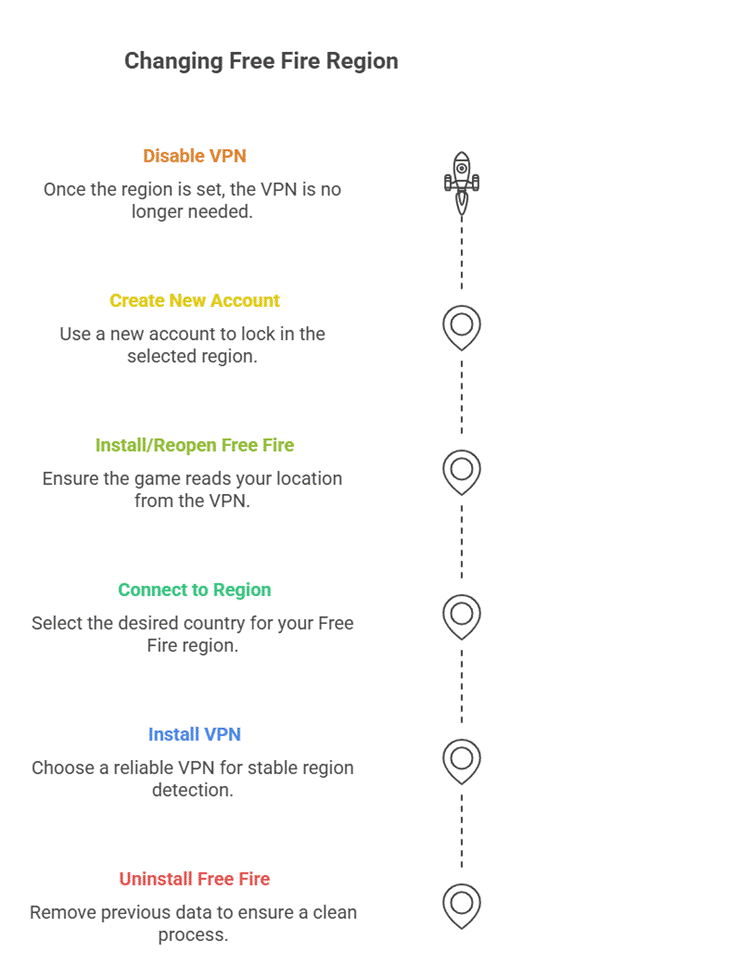
This method only works when creating a new account. If you apply it to an existing account, the region will not change.
1. Uninstall Free Fire (Optional but Recommended)
This removes previous cache and region data that may interfere with the process.
2. Install a Trusted VPN
Choose a premium or reliable VPN. Free VPNs may cause lag, display pop-up ads, and provide unstable region detection.
Recommended options:
- NordVPN
- ProtonVPN
- ExpressVPN
3. Connect to the Target Region
Select the country whose Free Fire region you want to join. For example:
- India
- Indonesia
- Brazil
- Singapore
- Thailand
- Middle East
4. Install or Reopen Free Fire While the VPN Is Active
This ensures Garena reads your location from the VPN server.
5. Create a New Account
Use one of the following methods:
- VK
- Guest account (availability varies by region)
Once the account is created while connected to the VPN, your region becomes permanently locked to the selected server.
6. Disable the VPN After Account Creation
Once the game loads your new region, the VPN is no longer required for daily login unless your IP triggers regional security blocks.
Is It Possible to Change Region in Free Fire in 2025?
Yes, it’s possible, but not through in-game settings. You can’t simply tap a button to change region. However, you can:
- Create a new account tied to another region
- Use a VPN before account creation
- Use regional guest account setup
- Transfer accounts only through limited support policies (rare cases)
Most players use the VPN method since it’s the safest and easiest approach.
How to Change Free Fire Region Without a VPN
Although more limited, some methods allow region changes without a VPN.
1. Create a New Account Using an International SIM
Some players use a SIM card from another region. Free Fire sometimes detects the SIM region during sign-up.
2. Use Guest Account Region Auto-Detection
If Free Fire is newly installed, it may assign a region based on your device locale.
3. Third-Party App Stores
Some regional app stores automatically assign servers. Examples:
- TapTap
- QooApp
This method has mixed results.
Can You Change Region in Free Fire Without Losing Your Old Account?
You can’t switch your existing account’s region. However, you can:
- Keep your old account
- Create a new account in a different region
- Switch between them by logging out and in
This allows you to enjoy both regions without deleting any data.
Are VPNs Safe for Free Fire?
Yes, as long as you use a VPN only when creating the account. The game doesn’t ban players for using VPNs, but your account might be flagged. To stay safe:
- Don’t use a VPN during matches
- Don’t switch regions repeatedly
- Avoid free VPNs that leak IP addresses
Advantages of Changing Your Free Fire Region
Switching regions brings several advantages depending on your goal:
1. Cheaper Diamonds
Some regions, such as Indonesia and Brazil, often have lower diamond pricing.
2. Unique Regional Events
Some servers get early access, special discounts, or exclusive bundles.
3. Smoother Gameplay
If your regional server is overloaded, another region may offer better match stability.
4. More Competitive Tournaments
Top regions like India or Thailand host more esports events.
Disadvantages of Changing Your Free Fire Region
While the process has benefits, you should also consider the drawbacks:
1. You’ll Lose Access to Your Old Progress
If you create a new account, nothing carries over—skins, diamonds, rank, or items.
2. Higher Ping
If the region is far from your location, gameplay might lag.
3. Different Language
You may encounter players who speak languages you don’t understand.
4. Account Linking Limitations
You can’t merge two different region accounts into one.
Best Regions to Switch to in Free Fire (2025 Edition)
1. Indonesia Server
Known for:
- Cheaper diamond top-ups
- Easier ranks for new players
- Unique bundles
2. Brazil Server
Offers:
- Massive events
- Strong esports scene
- Lots of free rewards
3. Singapore Server
Great for:
- Low ping across Asia
- Balanced matchmaking
4. Middle East Server
Popular for:
- Fast matchmaking
- Good for Pakistani and Indian players
5. India Server
If accessible, it offers:
- Huge player base
- Unique seasonal rewards
How to Check Your Current Free Fire Region
To confirm your region:
- Go to Settings
- Open the Account tab
- Look at your player ID prefix
- Check the leaderboard for regional players
Your ID structure usually matches your server region.
Frequently Asked Questions
Can you change region in Free Fire after account creation?
No, regions are permanently locked once an account is created.
Is region changing allowed by Garena?
Creating an account in another region is allowed. Changing an existing account’s region is not.
Will my old region friends appear in the new region?
No, friend lists don’t transfer across servers.
Can I play tournaments from another region?
You can only participate in tournaments hosted within your server region.
Final Words
Changing your region in Free Fire can bring new experiences, cheaper diamonds, and better events. Although the process isn’t officially supported for existing accounts, creating a new region-specific account is still possible and widely used. Choose your target region based on your goals—whether that’s lower ping, better rewards, or playing with friends.