How To Get Free Fire Advance Server
If you want to be among the first to try newly introduced features, securing access to the Free Fire Advance Server is one of the best steps you can take. This exclusive testing programme allows selected testers to use new characters, weapons, and pets, along with major gameplay changes before they’re officially released.
In this guide, I’ll provide detailed instructions on how to register, download, and successfully activate the Advance Server, including expert tips to help you get your access approved.
What Is Free Fire Advance Server?
The Advance Server is Garena’s testing server that runs before every major update. It’s primarily used to identify bugs and performance issues.
It’s separate from the main game and contains exclusive new features. Only selected players get the chance to test new content and report bugs.
The server is only available for a limited time during each testing period. While registration is completely free, access is limited, which means many players miss out on the opportunity.
Benefits of Joining the Free Fire Advance Server
The Advance Server provides several advantages that regular players cannot access:
- Exclusive early access to upcoming Free Fire features
- Opportunity to earn diamonds by reporting bugs
- Chance to test new modes, weapons, characters, and skins
- Priority access before millions of other players
- Experience future gameplay changes early
You can earn up to 3,000 diamonds based on the quality of your bug reports.
Requirements to Join Free Fire Advance Server
Before registering, ensure the following requirements are met:
- An active Facebook or Google account linked to Free Fire
- An Android device (the Advance Server is not officially available on iOS)
- At least 2GB RAM
- 1GB free storage space
- Stable internet connection
The server runs only for a few days during each update cycle, so staying informed about opening dates is essential.
How to Register for Free Fire Advance Server
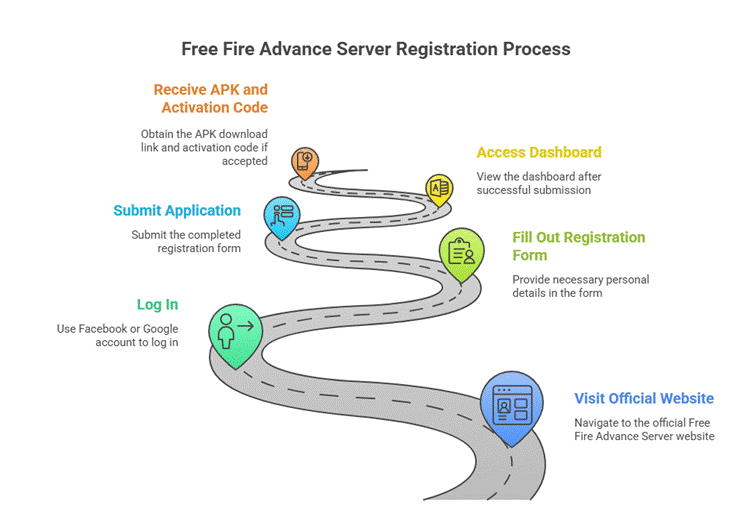
Follow these steps to register for the Free Fire Advance Server successfully:
Step 1: Visit the Official Free Fire Advance Server Website
Go to the official site:
https://ff-advance.ff.garena.com
Log in using your Facebook or Google account linked to your Free Fire profile.
Step 2: Fill Out the Registration Form
After logging in, a form will appear asking for:
- Full name
- Valid email address
- Active mobile number
Step 3: Submit Your Application
After completing the form, submit it. You’ll be redirected to the dashboard. If you’re accepted, you’ll receive the APK download link along with your activation code.
How to Download Free Fire Advance Server APK
Once approved:
- Log in to the Advance Server website.
- Click the “Download APK” button.
- Save the file to your device.
- Install the APK (enable “Install from Unknown Sources” first).
The file is approximately 800MB.
How to Get Your Free Fire Advance Server Activation Code
An activation code is required to log in to the Advance Server. Without this code, access is restricted.
How the Activation Code Is Provided:
- Codes are distributed only to selected players.
- They appear in your Advance Server dashboard when approved.
- Each code is unique and can only be used once.
If your dashboard doesn’t show a code, it means your registration is pending or wasn’t accepted for this cycle.
Free Fire Advance Server Activation Code – Important Notes
- Codes are limited and based on Garena’s selection.
- Using someone else’s code will not work.
- Codes cannot be purchased legally—avoid scams.
- Users who actively participate and report bugs have higher chances of future approval.
How to Log In to Free Fire Advance Server
After installing the APK:
- Open the game.
- Enter your activation code when prompted.
- Complete the login and start exploring the new features.
If you encounter login errors, reinstall the APK or check whether the server is still open.
Why You May Not Receive an Activation Code
Several factors can affect your approval:
- Limited spots available
- High demand during update cycles
- Incomplete or incorrect registration details
- Suspicious account activity
- Previous violations in Free Fire
Submitting accurate information and registering early increases your chances.
Bug Reporting in Free Fire Advance Server
Garena rewards active testers. You can report bugs directly within the Advance Server.
Types of Bugs You Can Report:
- Character skill errors
- Weapon glitches
- Gameplay bugs
- Login issues
- Graphics or animation errors
High-quality reports may earn you up to 3,000 diamonds.
Tips to Increase Your Chances of Getting Selected
- Register as soon as the portal opens
- Use a genuine Free Fire account
- Provide accurate details
- Maintain a clean gameplay record
- Participate in bug reporting consistently
Players who actively contribute are more likely to be approved in future updates.
Free Fire Advance Server Opening Dates
Garena releases the Advance Server before major updates such as:
- OB updates (e.g., OB45, OB46, etc.)
- Seasonal changes
- New character launches
Registration usually opens 1–2 weeks before the Advance Server goes live. Dates are announced on:
- The official Free Fire website
- Garena social media pages
- Community forums
Stay informed to avoid missing the next registration cycle.
Common Errors and Fixes for Free Fire Advance Server
1. APK Not Installing
Enable “Install from Unknown Sources” and ensure you have enough storage space.
2. Activation Code Not Working
Codes are single-use. Ensure there are no extra spaces when entering the code.
3. Server Busy or Full
Try again later. The server has limited slots.
4. Login Failed
Reinstall the APK or check whether the server period has ended.
Is the Free Fire Advance Server Safe?
Yes, the server is officially provided by Garena. It’s completely safe when downloaded from the official website.
Final Thoughts
The Free Fire Advance Server is an excellent opportunity for players who want to experience the latest features before everyone else. By following the steps above, you’ll be able to access the Advance Server—whether you’re playing for fun or to earn diamond rewards. Just remember to download the file only from the official Garena website.