How to Play Free Fire Without Downloading
Free Fire remains one of the top battle royale games, but many players prefer to play it without downloading it first. If you have a device with limited storage or underpowered hardware, this approach is ideal for you. Fortunately, there are several ways to play Free Fire without downloading the full app.
In this guide, I’ll cover all the ways to play Free Fire without downloading it, providing all the information you need for an instant start.
Why Playing Free Fire Without Downloading Is Possible
Free Fire can be played directly without installation thanks to cloud gaming platforms that enable players to stream the game via the internet. Players control the game on remote servers from their devices. This means that even if your device is too weak to run the game locally, you can still play it.
Benefits of Playing Free Fire Online Without Installation
Playing Free Fire without downloading provides several advantages:
- No storage burden, even on devices with limited space
- No updates required, as cloud platforms always have the latest versions
- Playable on low-end phones with 1GB or 2GB of RAM
- Quicker access with no long installation times
- Cross-device compatibility across mobile, PC, and browser
Best Platforms to Play Free Fire Without Downloading
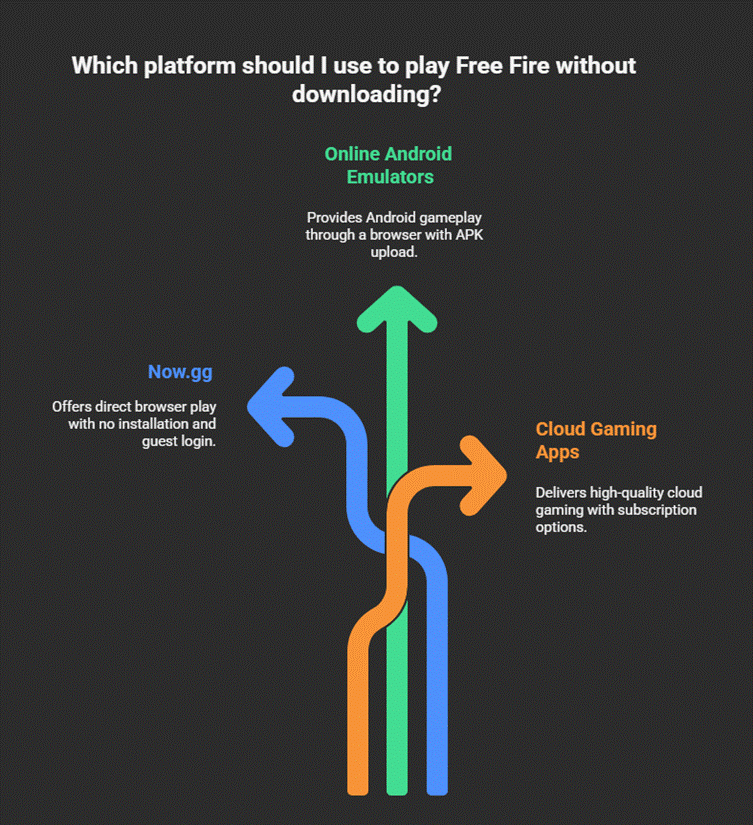
Below are the most reliable and stable platforms that allow access to Free Fire without requiring installation.
1. Now.gg Free Fire Online
Now.gg is the leading platform that enables playing Free Fire via a browser.
Key Features:
- No download or installation required
- Playable on any device
- Uses cloud servers for lag-free gaming
- Supports guest login, eliminating the need for immediate account access
How to Play:
- Go to the official Now.gg Free Fire page in your browser.
- Select “Play in Browser.”
- Wait for the cloud server to load.
- Log in with a guest account or your Free Fire ID.
- Start playing instantly.
2. Online Android Emulators
Several browser-based Android emulators let you play Free Fire without installing anything.
Popular Options Include:
- ApkOnline Emulator
- Appetize.io
- BlueStacks X Cloud Mode
Steps:
- Open the emulator website.
- Select “Launch Emulator.”
- Search for Free Fire or upload the APK link.
- Click start to load gameplay through cloud streaming.
These platforms work best on stable Wi-Fi connections.
3. Cloud Gaming Apps Supporting Free Fire
Some cloud gaming services provide Free Fire streaming without installation.
Trusted Options:
- Vortex Cloud Gaming
- NetBoom
- Gloud Games
What They Offer:
- Full access to Free Fire without installation
- High-quality cloud servers
- Playable on Android, iOS, and PC
Some platforms may require subscription plans, but they offer the smoothest gameplay experience.
How to Play Free Fire Without Downloading on PC
Playing on PC without installation is simple and provides better control for competitive gameplay.
Steps to Play on PC:
- Open your PC’s browser.
- Visit Now.gg or your preferred cloud gaming website.
- Select “Play Free Fire Online.”
- Connect your keyboard and mouse controls.
- Enjoy uninterrupted gameplay with better graphics.
How to Play Free Fire Without Downloading on Mobile
If you’re a mobile user, the process is straightforward.
Mobile Gameplay Steps:
- Open Chrome or Safari on your device.
- Go to Now.gg or a cloud gaming page.
- Tap “Play in Browser.”
- Rotate your screen to landscape mode for the best experience.
- Log in and start the match instantly.
Even devices with less than 1GB of free storage can run Free Fire this way.
Minimum Requirements for No-Download Gameplay
Even though you don’t install the game, certain requirements ensure smooth gameplay.
Device Requirements
- Any Android or iOS smartphone
- Windows or macOS PC
- Chromebook or smart TV with browser capability
Internet Requirements
- At least 10 Mbps internet speed
- Stable 4G, 5G, or Wi-Fi connection
- Low latency for lag-free matches
Tips to Improve Online Gameplay Without Downloading
Here are effective ways to reduce lag and maximise performance:
1. Use Fast and Stable Internet
Cloud gaming heavily depends on internet quality. For smooth play:
- Stay close to your router
- Use 5GHz Wi-Fi if available
- Avoid mobile hotspots
2. Clear Browser Cache
Clearing cached files helps reduce loading times.
3. Use Updated Browsers
The latest version of Chrome, Edge, or Safari ensures full compatibility.
4. Close Background Apps
Freeing up RAM results in smoother streaming.
5. Switch to Desktop Mode on Mobile
This can improve control responsiveness on some cloud platforms.
Is It Safe to Play Free Fire Without Downloading?
Yes, it’s safe to play as long as you use trusted platforms and avoid shady websites.
Can You Use Your Original Free Fire Account?
Yes. Cloud platforms let you log in using:
- Free Fire ID
- Guest login
Your progress, skins, and diamonds remain secure.
Common Issues and Solutions
Here are the most frequent issues players face and how to fix them.
1. Game Not Loading
Solution:
- Refresh the page
- Switch to a different browser
- Check your internet connection
2. Lag or Frame Drops
Solution:
- Use faster Wi-Fi
- Close background apps
- Reduce cloud streaming quality
3. Controls Not Responding
Solution:
- Switch to full-screen mode
- Enable desktop mode on mobile
- Reconnect your keyboard or controller
Final Thoughts
Playing Free Fire without downloading is perfect for those who want quick access, minimal storage usage, and smooth gameplay on any device. Cloud gaming allows you to play even on low-end phones or when sharing a device. With the tools and methods mentioned above, you can start playing without the burden of installation or heavy updates.