How To Recover a Free Fire Account?
If you play Free Fire and have lost your account for any reason, you probably want to recover it but don’t know how. Don’t worry.
This recovery guide is detailed and precise to help you restore your Free Fire account safely and quickly. It covers all the recovery methods that players around the globe use, as well as troubleshooting steps and solutions.
Why Free Fire Account Recovery Is Important
A Free Fire account is a virtual space where your game progress, skins, coins, rank history, characters, and linked social media accounts are stored. Losing access means losing years of game data. With the proper recovery process, every player can recover their account without losing any progress.
Here is a complete and comprehensive guide for recovering your Free Fire account via approved methods.
Types of Free Fire Login Methods
Before starting the recovery steps, it’s essential to know how the account was originally created. Free Fire supports several login platforms:
- Google (Gmail)
- VK
- Apple ID
- Twitter (X)
- Huawei ID
- Guest Account
How to Recover a Free Fire Account Linked with Facebook
1. Reset Your Facebook Password
If you use Facebook to log in, recovery is straightforward. You can simply reset your Facebook password.
Follow these steps:
- Go to the Facebook login page.
- Select “Forgot Password.”
- Enter the email or phone number linked with the account.
- Create a new password.
- Return to Free Fire and log in using Facebook.
2. Recover Facebook via Trusted Contacts
If you’ve lost access to your email or phone number:
- Open the Facebook recovery page.
- Choose “No longer have access.”
- Use trusted contacts to get the recovery code.
- Regain access and log in to Free Fire.
3. If Facebook Was Hacked
If someone hacked your Facebook account:
- Visit facebook.com/hacked.
- Follow the security checkup.
- Reset your login details.
- Log back into Free Fire.
How to Recover a Free Fire Account Linked with Google (Gmail)
1. Use Google Account Recovery
If your Free Fire account is linked to Gmail:
- Go to the Google Account Recovery page.
- Enter your Gmail address.
- Answer the verification questions.
- Reset your password.
- Log back into Free Fire using Google.
2. If Your Google Account Is Disabled
Google sometimes disables accounts temporarily:
- Go to support.google.com/accounts/troubleshooter/6357590.
- Submit a recovery request.
- Wait for reactivation.
- Log in to Free Fire after recovery.
How to Recover a Free Fire Account Linked with Apple ID
If you used Apple ID to log in:
- Visit iforgot.apple.com.
- Enter your Apple ID.
- Complete verification.
- Reset your password.
- Log in to Free Fire again using Apple ID.
This method works for all iPhone and iPad users who connected Free Fire with Apple Game Centre.
How to Recover a Free Fire Account Linked with Twitter (X)
- Go to the Twitter login page.
- Select “Forgot Password.”
- Enter your email or phone number.
- Reset your password.
- Open Free Fire and log in using Twitter.
If your Twitter account was suspended, appeal at help.twitter.com/forms/general?subtopic=suspended.
How to Recover a Free Fire Account Linked with VK
For players who used VK to log in:
- Visit the VK recovery page.
- Use phone or email verification.
- Reset your password.
- Return to Free Fire and log in.
Steps to Recover Your Free Fire Account Using Your UID
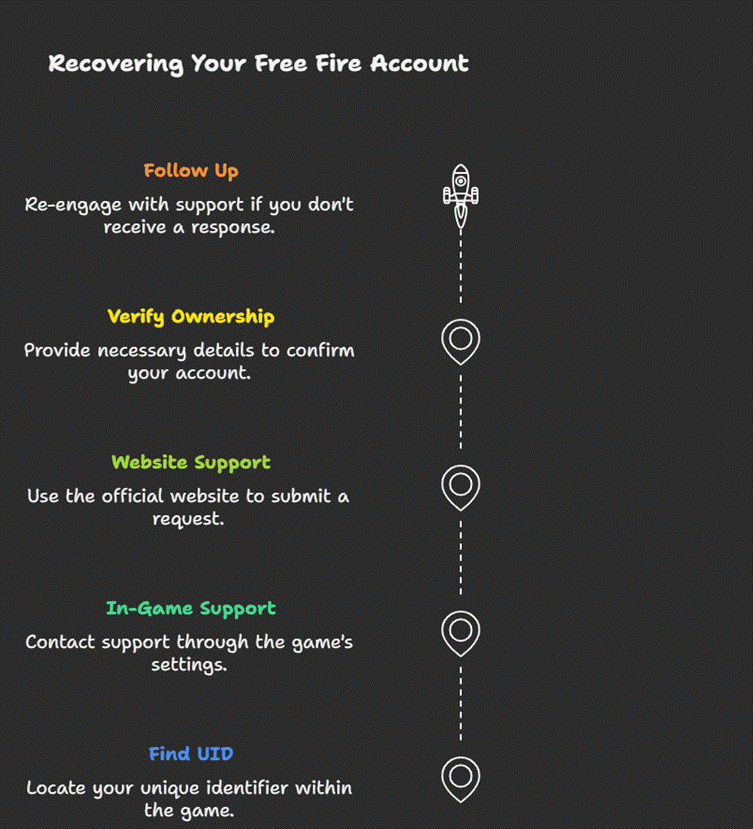
Your UID is the unique identifier that distinguishes your Free Fire account from others. It’s a numerical value that represents your identity in the game and is essential when recovering your account.
Step 1: Find Your UID
If you still have access to Free Fire, here’s how to locate it:
- Open the game and log in.
- Tap your profile picture in the top-left corner.
- Your UID will be displayed directly under your profile name.
Step 2: Reach Out to Free Fire Support
After finding your UID, you need to contact support. You can do this through the game.
Using the In-Game Support Option
- Open Free Fire and go to Settings.
- Tap on “Customer Service” or “Help Centre.”
- Follow the instructions to create a support ticket. Remember to include your UID and a description of the issue.
Step 3: Use the Free Fire Support Website
If you can’t use the in-game option, you can still get help online.
- Go to the official support website.
- Find the “Submit a Request” section.
- Complete the form with your UID and a detailed description of the problem.
- Attach screenshots of any proof that you are the account owner.
Step 4: Verify Your Account Ownership
To protect players, the support team may ask for additional details. Be ready to share:
- Your UID and in-game name
- Screenshots of your account
- Receipts or transaction IDs for recent purchases
- The last time you logged in
- Any email or phone number linked to the account
Step 5: Follow Up When Needed
The process can take some time to complete. If you don’t receive a reply, contact support again.
How to Recover a Hacked Free Fire Account
If someone else has taken over your account, act fast.
What to Do Immediately
- If you still have access, change your password immediately.
- If you can’t log in, contact Free Fire Support and provide proof that the account is yours.
Support Link: https://ffsupport.garena.com/hc/en-us
Contacting Support for a Hacked Account
- Go to the support website.
- Submit a ticket with your username, player ID, and proof of purchases.
- Wait for the support team to respond and follow their instructions carefully.
How to Recover a Banned Free Fire Account
Account bans depend on the reason for the ban.
- Temporary Bans: You’ll need to wait until the ban period ends.
- Permanent Bans: If your ban was issued in error, you can contact support and explain the situation.
Recovering a Guest Account (Most Difficult)
Guest accounts are stored locally on the device. If you:
- Reset your phone
- Uninstalled the game
- Switched devices
…your guest account data may be permanently lost.
However, recovery is possible if:
- You backed up your device data.
- You used cloud backup on Android.
To attempt recovery:
- Restore your old device backup.
- Reinstall Free Fire.
- The guest data may reload automatically.
For guest accounts without backups, Garena cannot restore them.
Recover Free Fire Account Through Garena Support
If none of the login methods work, or your account was hacked, banned, or unlinked, you can recover it through Garena Support.
Steps to Submit a Recovery Ticket
- Visit the official support site:
https://ffsupport.garena.com - Log in using your platform (Facebook, Google, etc.).
- Select “Account Issue” or “Account Hacked.”
- Provide accurate details:
- Player ID
- In-game name
- Level and rank
- Purchase history
- Device used
- Account creation date
- Upload proof of account ownership:
- Screenshots of past purchases
- Old gameplay screenshots
- Login history
Garena typically replies within 48 to 72 hours.
Required Details for Successful Account Recovery
To confirm ownership, Garena may ask for:
- Free Fire Player ID
- Account creation date
- In-game purchase receipts
- Device model used previously
- Last login date
- Registered login platform
- Player nickname
- Country or region
The more accurate your information, the higher your chances of recovery.
How to Recover a Free Fire Account After It Was Hacked
If someone gained access to your account:
- Immediately reset your login password (Facebook, Google, Apple, etc.).
- Remove unknown devices from your login sessions.
- Enable two-factor authentication.
- Contact Garena Support with proof of ownership.
Garena can restore hacked accounts if ownership is verified.
How to Recover a Free Fire Account Without Player ID
If you don’t remember your Player ID:
- Check old screenshots.
- Ask friends in-game (if linked through Facebook or Google).
- Search older device backups.
- Check previous purchase receipts from Google Play or the App Store (they sometimes include the Player ID).
If you still can’t find it, Garena Support can help identify your account through:
- Old nickname
- Character skins
- Top-up receipts
- Login platform used
How to Protect Your Free Fire Account from Future Loss
To avoid losing your account again:
- Never use a guest account.
- Link your account with multiple platforms (Facebook + Google).
- Enable two-factor authentication.
- Avoid sharing login details with others.
- Do not use suspicious third-party apps.
- Regularly update your recovery email and phone number.
These steps help ensure long-term account safety.
Final Thoughts
Recovering a Free Fire account is possible with the right approach. Whether you lost access due to forgotten passwords, hacking, device changes, or login issues, every situation has a practical solution. Follow the detailed steps provided above, and you’ll be able to recover your account quickly and safely.